Guests order from their own phones. Your kitchen gets it instantly.
Guests scan the QR card on their table, then order, call a waiter or ask for the bill right from their phone. Orders appear on your PC and print in the kitchen. It runs on a computer in your restaurant: no tablets to buy, no internet needed.
- No app for guests to install
- Keeps working when the internet is down
- Set up in an afternoon
- No tabletsGuests use their own phones
- Works offlineRuns on your own Wi-Fi
- 5 guest languagesGuests pick theirs
- Kitchen ticketsPrinted as orders arrive
From table to kitchen in three steps
Put a QR card on each table
Print the cards from the app. One code joins guests to your Wi-Fi, the other opens your menu for that table.
Guests order from their phone
Photos, options and notes for the kitchen. Guests can also call a waiter, ask for water or request the bill.
Your team serves
Orders pop up on the PC with a sound and print in the kitchen. Take payment, split the bill and close the table.
Everything a busy floor needs, nothing it doesn't
QR ordering
A secret code per table, so orders always land on the right bill. Codes never expire unless you renew them.
Runs on your own network
Your PC serves the menu over your Wi-Fi. If the internet drops, guests keep ordering.
Kitchen and bill printing
Tickets print on network receipt printers, each dish at the station that makes it. Bills print too.
Requests from the table
Call a waiter, ask for the bill, water, napkins or anything else, with a confirmation so nobody taps by accident.
Bills that add up
Prices are always worked out on your PC. Split a bill across cash, card and QR. Guests choose their own tip.
Easy menu editor
Photos, options and extras, allergens, spice level and a one-tap "sold out". Changes reach guests at once.
Activity log
Every order, payment and change, with who did it and when. Filter by day or person and export to a spreadsheet.
Daily reports
Sales, payments by method, best sellers and busy hours, with CSV export for your accountant.
Guests' own language
The guest menu speaks English, Mongolian, Russian, Chinese and Korean, with more on the way.
Clear screens your staff learn in minutes
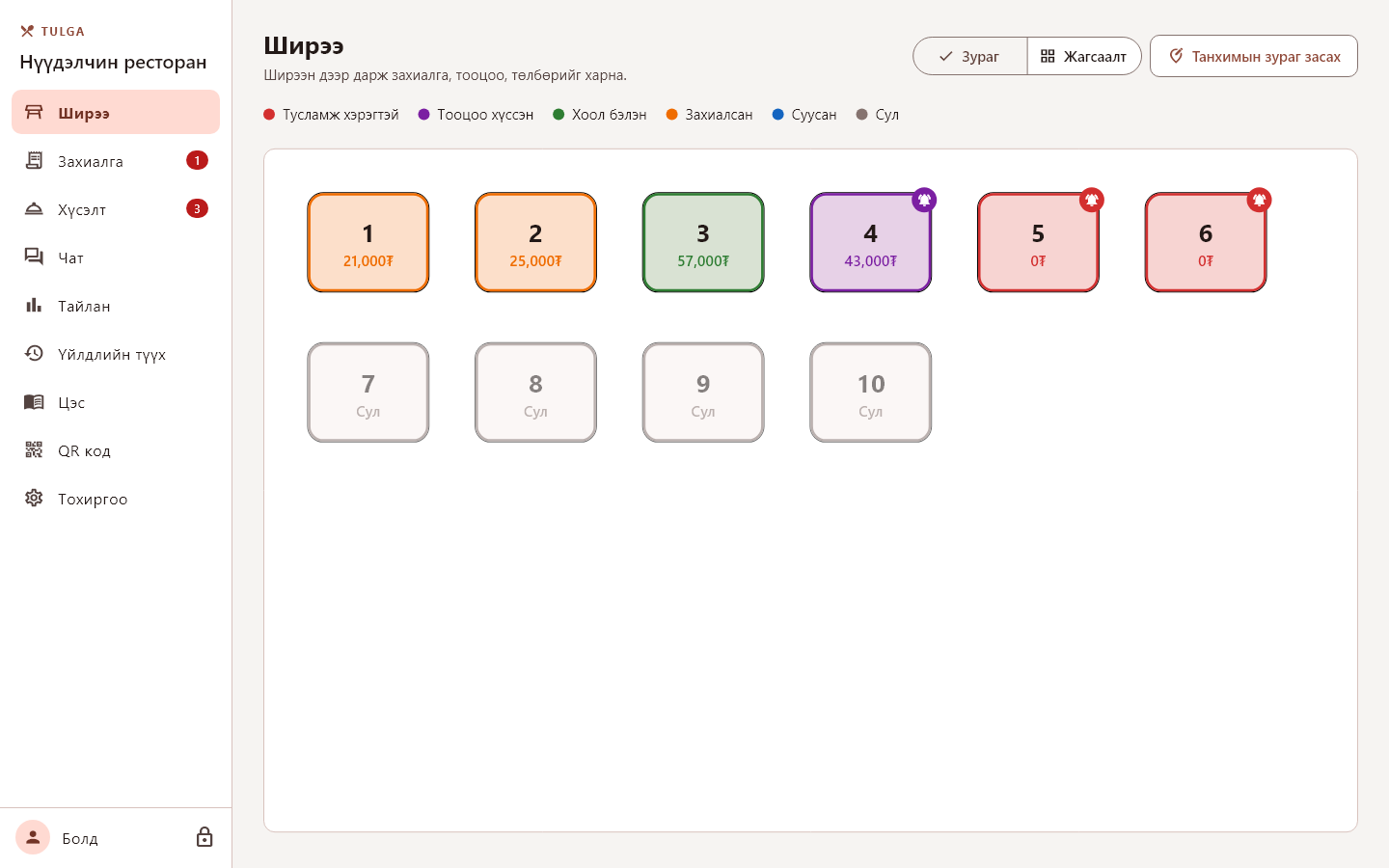
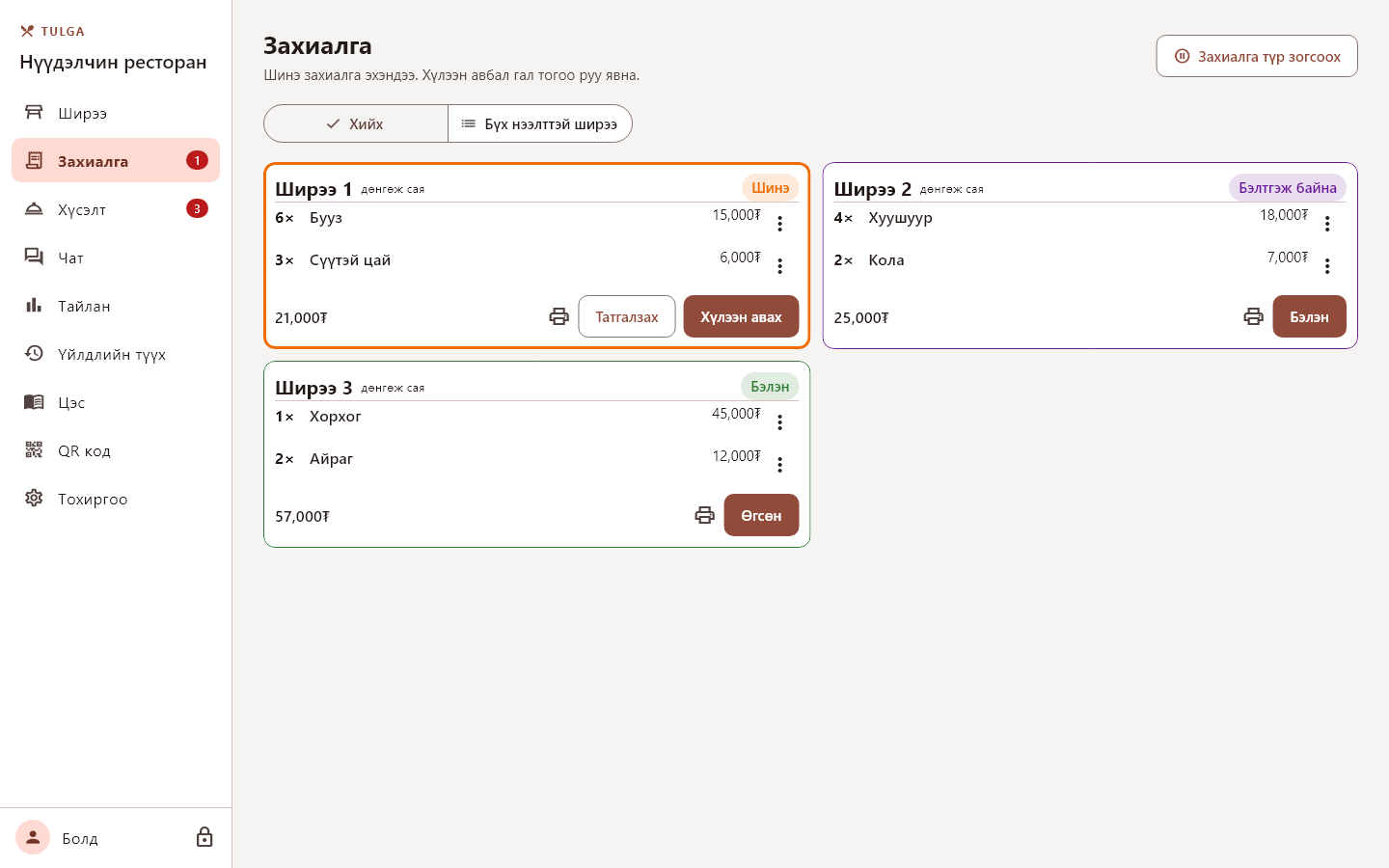
Screens shown with Mongolian staff texts; staff screens also come in English.
Simple plans, cancel anytime
One license per restaurant computer. Every plan includes updates and support.
Basic
For small cafés getting started.
- QR ordering from guests' phones
- Up to 15 tables
- Kitchen and bill printing
- Menu editor with photos and options
- Staff logins with PIN
Standard
For busy restaurants.
- Everything in Basic
- Unlimited tables
- Split bills and guest tips
- Daily reports and CSV export
- Activity log of every action
- Chat and gifts between tables
Pro
For larger venues and groups.
- Everything in Standard
- Several kitchen and bar printers
- Priority support
- Early access to new features
Taxes are calculated at checkout. Payments are handled by our reseller, Lemon Squeezy.
Questions restaurants ask
Do guests need to install an app?
No. They scan the QR card on their table and the menu opens in their phone's browser.
Does it need the internet?
Ordering runs on your restaurant's own Wi-Fi, with your PC as the server, so service carries on when the internet is down. The app goes online now and then to check its license.
What equipment do I need?
A Windows 10 or 11 PC that stays on during service, a Wi-Fi router for guests, and optionally network receipt printers (ESC/POS, 58 or 80 mm) for the kitchen and bills. See requirements.
Can guests pay on their phone?
Not yet. Guests ask for the bill from their phone and see the total; your staff take payment by cash, card or QR, and a bill can be split across methods.
Where is my data kept?
On your own PC. Menus, orders and the activity log stay in your restaurant, and the app makes a backup every time it starts.
Can I use one license on two computers?
A license runs on one computer at a time. When you move to a new PC, release the old one and activate the new one.
How do I cancel?
Cancel anytime from the link in your receipt email. The app keeps working until the end of the period you paid for.
Ready to try it in your restaurant?
Download the app, add your menu and print your table cards.